 BDG Game
BDG Login
BDG Game
BDG Login
BDG Game Customer Care, BDG Game Not Working, lottery and wallet checks
Separate the issue into route loading, login, app, lobby, a specific lottery game, deposit, withdrawal or account security.
A precise category prevents unrelated fixes from being tried in the wrong order.
Record the exact message and time before the screen changes.
The BDG route will not open
Try one refresh, then compare another connection or browser.
Check date and time settings, private DNS, extensions and available device storage.
If the route is unavailable across devices, wait instead of installing files from unrelated messages.
BDG login details are rejected
Confirm whether the account uses phone, email or account ID and check the country code.
Remove an incorrect saved password before entering the current one manually.
Use recovery before creating a duplicate account.
The app shows a blank or frozen lobby
Close and reopen the app, check storage and update the Android web component.
Compare the live browser route to determine whether the account or the installed package is affected.
Record the original login method before clearing app data or reinstalling.
Win Go, MotoRace, TRX Win or K3 stops updating
Check the game name, active period and countdown.
If the screen reconnects after the period closes, use result history rather than tapping again.
Repeated actions during reconnection can create an uncertain record.
A BDG deposit is completed but the balance is unchanged
Match the amount, channel, time and platform order with the external payment confirmation.
Refresh the account once and wait for the order status before paying again.
Do not share a UPI PIN, OTP or private wallet key with support.
Withdrawal is disabled, pending or failed
Read the on-screen reason, beneficiary details, available and frozen balance, minimum amount and any account condition.
Pending is not the same as completed or failed. Preserve each status change.
Secure the account if an unfamiliar beneficiary or method appears.
Account or activity details look unfamiliar
Stop wallet and game activity, change the password through the verified route and review sessions or beneficiaries.
Hide private details in screenshots used for a support record.
Do not install remote-access software or disclose an OTP.
Use a safe retry order
Refresh once, confirm connection, reopen the account and check one relevant record.
Clear cache only after the login method is known; clear data or reinstall only when smaller steps fail.
Avoid rapid repeated taps on payment or game controls.
Prepare one complete BDG problem report
Include the platform section, device, route, time, error text and the record relevant to the issue.
For games, add the game and period. For payments, add amount, method and status.
Never include passwords, PINs, OTPs or unnecessary identity documents.
Confirm whether the BDG issue is local or platform-wide
Test the same current route on one alternative browser or connection. If only one device fails, cache, storage, DNS or app settings are more likely.
If several devices show the same unavailable screen, wait rather than installing files from messages or unofficial mirrors.
Record the time and visible error before it changes.
Check the BDG lobby identity after recovery
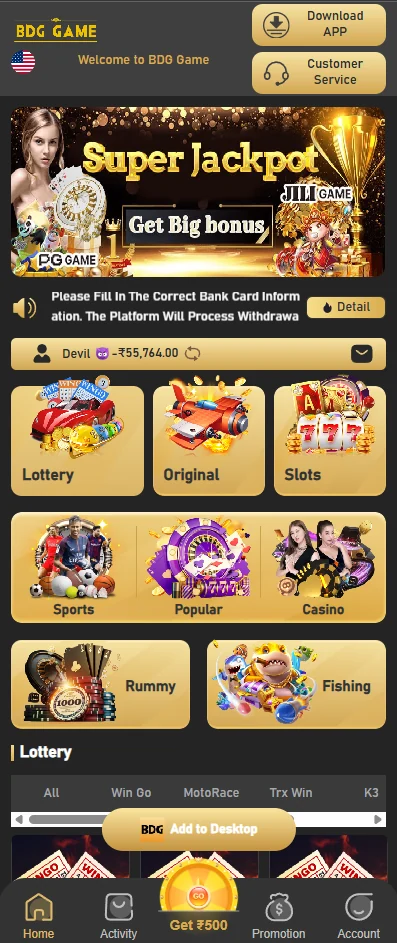
When access returns, verify the account strip, balance, category row and bottom navigation before continuing.
A recovered screen that opens another brand or an unfamiliar payment form should not receive BDG credentials.
Remove old bookmarks or packages that no longer match the current interface.
Use a game-specific record for lottery faults
For Win Go, MotoRace, TRX Win or K3, keep the game name, period, selected action and result or history screen.
A generic screenshot of the lobby cannot establish what happened in a specific round.
Hide account identifiers and balances before sharing the record.
Use a payment-specific record for wallet faults
For deposit or withdrawal, keep the amount, method, order time, platform status and external payment result.
Do not send a second payment while the first order is still uncertain.
Never provide a UPI PIN, OTP, private key or remote-access control.
Know when to stop troubleshooting
Stop repeated login, game and wallet attempts when the same error continues. More actions can create duplicate or confusing records.
Preserve the evidence, secure the account if needed and wait for a clear response or status.
Do not borrow, deposit more or extend a session simply to test whether the platform has recovered.
Check updates and stored sessions before reinstalling
An outdated package or damaged local session can produce repeated blank screens. Check for an update and confirm the login method before clearing data.
Reinstalling should be a later step after connection, storage, cache and browser comparison have been tried.
Do not create another BDG account simply because the local session was removed.
Compare the live BDG route with the installed package
Open the current browser route and compare the login fields, lobby categories and account controls.
If the browser route works while the package fails, focus on the app, permissions or web component rather than the account.
If both fail in the same way, preserve the message and wait before repeating wallet or game actions.
Protect the account during a service interruption
Change the password through the verified route if there is evidence of unfamiliar access, beneficiary changes or account activity.
Do not approve remote control, screen sharing or one-time codes offered by an unverified support profile.
Keep recovery phone or email access available until the account is stable again.
Close the issue with a final status check
After recovery, verify the account name, balance, recent lottery history and wallet orders before resuming use.
Record the final outcome of any pending deposit or withdrawal so the timeline is complete.
Remove obsolete bookmarks, screenshots containing private details and untrusted files that were collected during troubleshooting.
Confirm the account is stable before normal use
After the original issue is resolved, open the account, lottery history and wallet records once before resuming normal activity.
A restored screen can still contain an old session, delayed balance or unresolved beneficiary change.
Resume only when the account identity and relevant records match the expected BDG profile.